Chat that stays usable for business
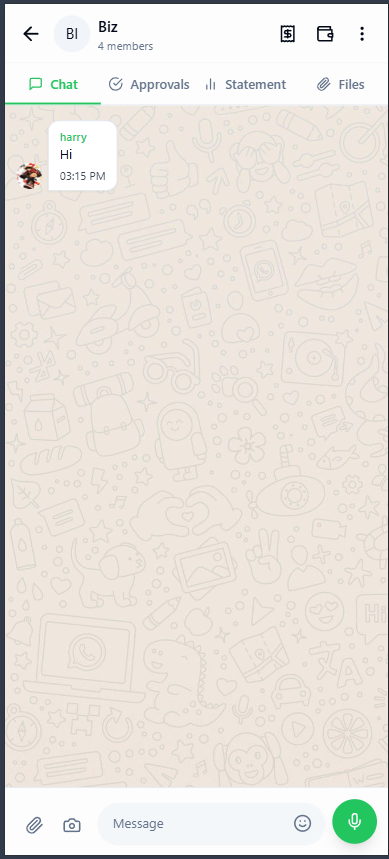
Direct chat, group chat, media sharing, forwarded messages, and polls all stay in one conversation history.
MAVE is built for person-to-person chat, group chat, bill creation inside conversations, approval or decline flows, and full payment follow-up. Teams can send messages, media, polls, forwards, and keep a live summary of pending payments without losing business context.
Registration is simple: users sign up with name, mobile number, and email. Contacts help start chats faster, media access supports receipts and files, and messages stay encrypted in transit.
App wallpaper
The site now follows the same default wallpapers used inside the app, so the brand feels familiar before download.
Live workflow
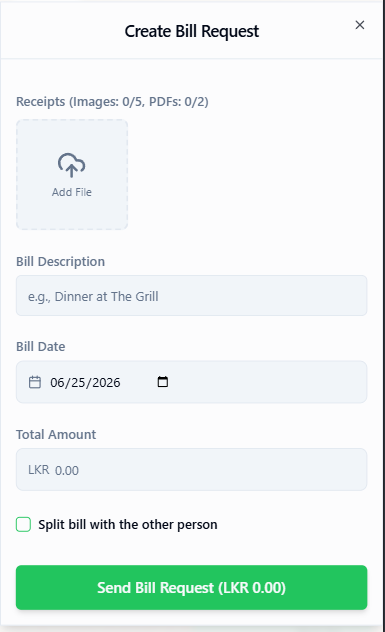
Create a bill inside chat, share the slip, then get an approve or decline response.
Every deal stays connected to its chat thread instead of being scattered between apps.
Download the app
Google Play can go live here as soon as you replace the placeholder URL. The App Store badge stays ready for review and activation after Apple approval.
MAVE lets the same people who are chatting also request money, review receipts, mark payment, and keep the other side informed without leaving the conversation.
One-to-one conversations and group discussions both support the same business workflow.
Users can create bills, attach receipts or PDFs, and request action from the other side.
Other users review requests, respond clearly, and keep the payment history visible to the group.
Track pending payments, completed approvals, bill splits, and each business deal from one summary.
The app is not only for chatting. It is also a collaboration layer for bills, receipts, approval status, and shared business tracking.
Direct chat, group chat, media sharing, forwarded messages, and polls all stay in one conversation history.
Create bills, split shared costs, upload slips, and keep every participant aware of who paid or still needs to pay.
Get summaries of open payments, approved requests, declined actions, and completed payment proofs.
Messages and shared workflow activity are designed for secure communication between users and teams.
This section is now arranged so you can replace each screenshot slot with matching dark and light exports of the same page later. When the site theme changes, these image slots can change with it automatically.
.png)
.png)
.png)
How to use this later
Export the same app page in dark and light mode, save both images, then replace each `data-dark-src` and `data-light-src` pair. The site will switch them together with the theme toggle.
.png)
.png)
Apple and Google reviewers often look for whether the website explains why the app asks for contacts or media. This section makes that clearer without sounding technical or hidden.